
Yesterday I shipped Organize Tabs 2.0, a rewrite of a Chrome extension I had been using daily since 2020. I said I would write up how it was built, because most of it was built with Claude Code, and the interesting part was not the speed.
Here is what the two weeks actually looked like.
The shape of it
| Started | September 29, with a request to analyse the old code and tell me what was wrong with it |
| Merged | October 9, pull request #9, nine commits, +4,814 / −673 lines |
| Published | October 10 on the Chrome Web Store |
| Follow-up | October 11, 2.1.0 with a customizable layout, after a day of using 2.0 |
The old extension was one 520-line file. The new one is about 3,500 lines of source, of which 750 are a pure module with no Chrome API calls, 29 unit tests, and an end-to-end suite of 48 checks that drives the real extension in a headless browser. Nineteen duplicate rules, an options page, a demo video that records itself.
Calendar time was two weeks. Hands-on time was a handful of evenings, most of them spent reading, deciding and testing rather than typing.
It started with a code review of my own code
The first thing I asked for was not code. I pasted a screenshot of the popup, listed what I liked and what annoyed me, and asked what I should improve.
The answer was more useful than I expected, because it started with bugs I did not know I had. “Bring All Windows To Front” had never worked: the action table used an object shorthand instead of a callback: key, and the handler incremented a const. The popup ran all the tab logic itself, and Chrome closes a popup the moment a new window is created, so consolidating tabs was killing its own promise chain halfway through. Collate created windows in parallel and each one ran a global cleanup that could close a sibling before its tabs arrived.
I had worked around all three for years without knowing why they were flaky. That review set the architecture for the rewrite: every tab operation runs in the service worker, the popup only sends messages, and window creation is sequential.
What I did and what it did
I want to be precise about this, because “built with AI” covers a lot of ground.
I supplied the problem. The habit of opening every pinged link and using tabs as a to-do list. The specific duplicate shapes: a pull request and its Files tab, a Jira issue and its board link, a LinkedIn profile and its Experience page. The fact that I am usually on a Google Meet while tidying.
I made the calls. Vanilla JavaScript, no build step, no dependencies, same as the original. Tab groups instead of windows. Favorites and reordering instead of a fixed list. The name of the sandbox. Version 2.0 rather than 1.0, after discovering the published version was 0.9 and not the 0.8 in git.
It drafted nearly everything. The URL normalizer and rule engine, the service worker, the popup, the options page, the test suites, the CI workflow, the store listing copy, the demo recorder. First drafts of all of it were on disk within hours, and most survived with edits rather than rewrites.
I used it and said no. This is where the real work was.
The real work was constraints
Every design rule the extension now has came from me using a draft and objecting.
I ran the first version against my real hundred tabs. Sort moved a pinned tab. Consolidate dropped every tab out of its group, because that is what Chrome does when a single tab changes windows. I said: never move a pinned tab, and never break a group. The second rule turned into the most intricate code in the extension, which moves whole groups between windows with the tab groups API, merges into a same-named group at the destination, and rebuilds the group when only part of it moves.
I said: I am on a call while doing this. That became a rule that windows holding a meeting or playing media are primary, and Consolidate and Split leave them alone, plus a button to pull every meeting into its own window.
I said: I do not trust a button that closes forty tabs. That became a preview before every close, and an undo.
None of those were features I would have listed up front. They were refusals, discovered by use. Deciding what a tool must not do turned out to be the part only I could do, and it was the part that took the time.
Testing was the fun part
The pure module has a normal node --test suite, and adding a rule means adding a test with the URL variants that must collapse and one that must not. That is table stakes.
The end-to-end suite is the part I am pleased with. A script launches a headless Chromium with the extension loaded, connects over the DevTools protocol, seeds windows full of tabs, then calls every action and asserts on the resulting windows, groups and pinned state. It found things I would never have caught by hand:
- Chrome for Testing ships built-in extensions with their own service workers, so matching on
background.jspicked the wrong one. - Headless Chrome reports several windows as focused at once, which exposed that Consolidate chose its target by the focused flag. It now prefers the window you invoked it from, which is better in real browsers too.
- A video popped out into its own window lives in a
popup-type window, and Chrome refuses to move tabs into or out of those. The first time I hit that was in my real browser, with a red error toast. The suite now has a popped-out YouTube window in it.
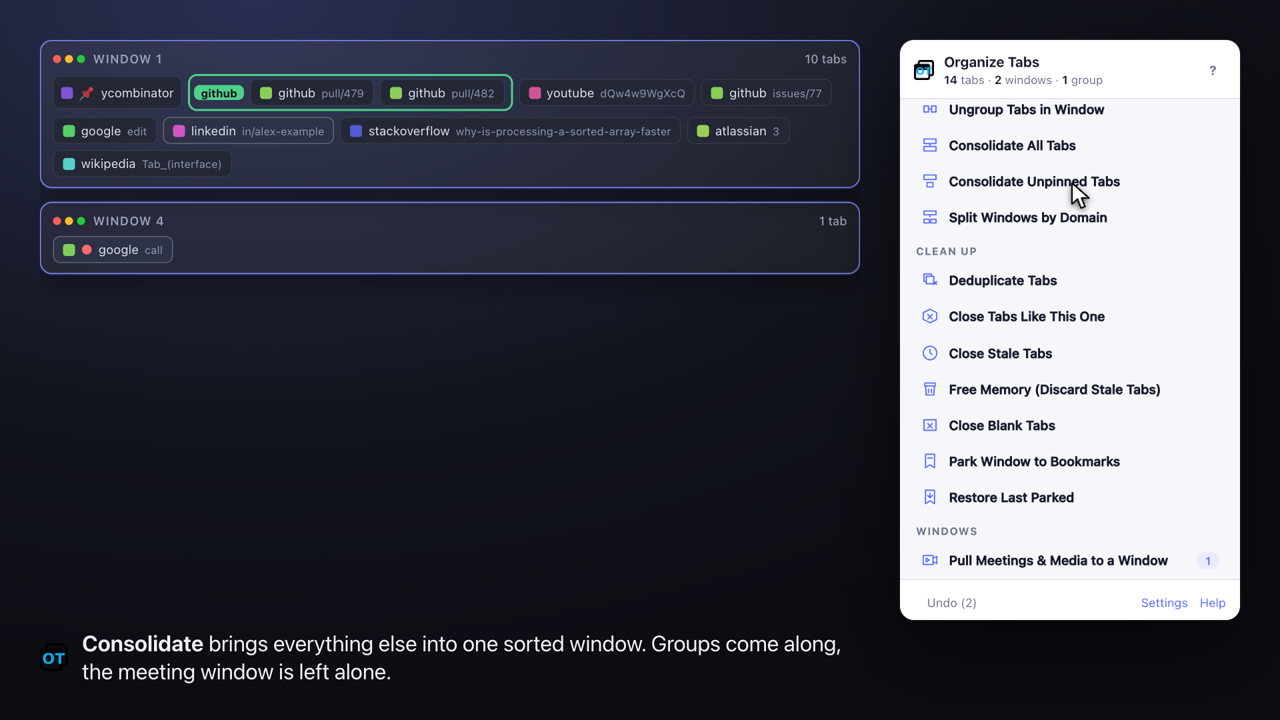
The same harness records the demo video. Each frame is a stage page composing a live map of the browser’s windows next to a screenshot of the popup, with a drawn cursor and a caption. No screen recorder, no editing, and I can re-record after any UI change with make demo.
The holodeck
Browser tests close and move tabs across every window. They cannot run against a profile I care about, and Chrome refuses to start a second instance on a profile that is already open anyway.
So every run uses a throwaway profile under ~/.holodeck/. The interactive one is named “🧪 holodeck” in the browser’s profile chip so I always know where I am. The automated ones are created fresh and deleted after each run. The rule, written into the repo’s AGENTS.md, is that humans and AI agents may create, inspect and destroy anything under that directory without asking.
We brainstormed names. Danger room was the runner-up. Holodeck won because it is one word, and because “computer, end program” is exactly what make dev-clean does. The convention has already spread to my other projects.
The review that found ten bugs
The day before release I asked for one more pass: an adversarial review of the whole pull request, assuming it was wrong until proven safe.
It came back with ten real defects, all in code the same tool had written days earlier. The worst: with auto-deduplicate on, Undo reopened the tabs it had closed, and auto-dedupe immediately closed them again as fresh duplicates. Undo was a no-op. Another: a duplicate closed in an incognito window, after that window was gone, would be reopened by Undo in a normal window, writing a private URL into history. Another: when settings overflowed the sync quota and fell back to local storage, the next load read the stale sync copy and silently reverted.
I would not have found any of those before shipping. All ten were fixed, with tests, in an afternoon.
The lesson is not that the tool is unreliable. It is that drafting and reviewing are different activities, and you have to ask for the second one explicitly. The same model that wrote the bug found the bug when its job was to find bugs.
The mundane parts were still mundane
For balance, the things that went sideways had nothing to do with intelligence:
- Google Chrome’s branded build silently stopped honouring
--load-extensionsome versions ago, so the test harness defaults to Brave, with Chrome for Testing in CI. - My SSH agent started offering the wrong GitHub key, and a push failed mid-release with a permission error from an account I had forgotten existed.
- The Chrome Web Store summary is the manifest description and is capped at 132 characters. Mine was 155.
- Hacker News auto-killed my Show HN comment for having links in it.
An AI pair does not make any of that go away. It does make it cheaper to work around, because the context is already loaded and the fix is a sentence.
What I would tell someone starting
- Start by asking for a review of what you have. The bugs in my old code shaped the new architecture more than any feature request.
- Decide the constraints yourself, by using it. The tool will happily build a feature. It cannot know that your meeting window is sacred until you say so.
- Build the test harness early and make it real. A browser-level suite caught every platform quirk. Unit tests alone would have caught none of them.
- Ask for an adversarial review before shipping, as a separate step. Then fix everything it finds, because it will be right more often than you are comfortable with.
- Give the agent a sandbox with a name. A clear place it may trash removes a whole category of hesitation, for both of you.
The extension is on the Chrome Web Store and on GitHub, where the AGENTS.md, the e2e harness and the demo recorder are all there to borrow.
Conversation
Comments are hosted by Disqus.